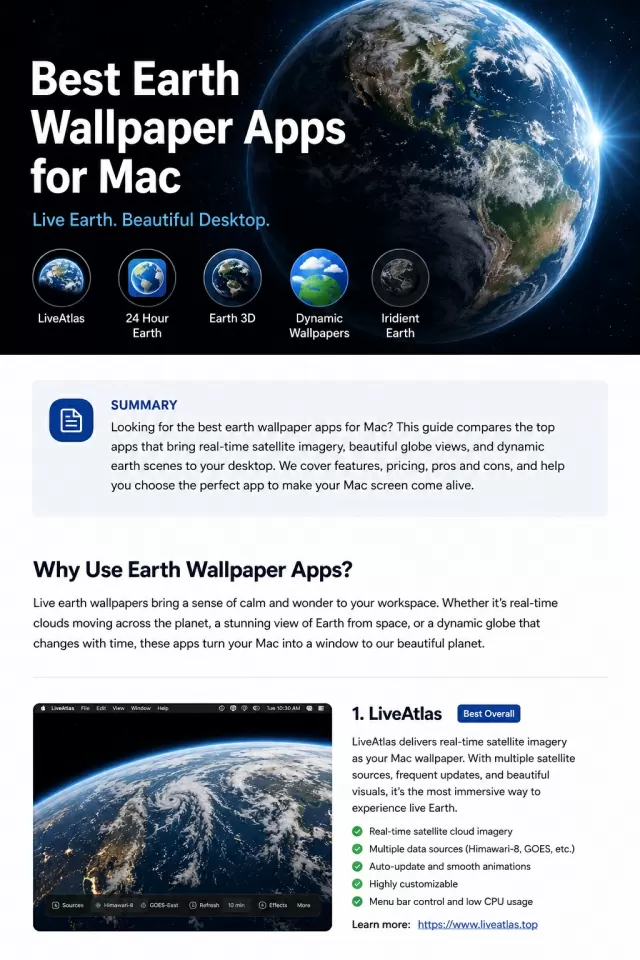
If you want an Earth wallpaper on your Mac, first decide what “live” should mean. Some apps show current satellite imagery, some render an interactive 3D globe, and others simply change a scenic image with the time of day.
The best choice is therefore not one universal winner. It is the app that matches the kind of Earth view you actually want to see every day.
Quick answer: the best Earth wallpaper apps for Mac
- LiveAtlas — best for automatically updated satellite cloud imagery and weather-aware Earth views.
- Downlink — best for a focused full-disk satellite image with a simple desktop workflow.
- Earth 3D — best for an interactive rendered globe, city lights, and educational exploration.
- 24 Hour Wallpaper — best for polished landscapes and city scenes that change with local time.
- Dynamic Wallpaper Club — best for free community-made dynamic wallpapers.
- Apple’s built-in aerial screen savers — best if you want a no-install Earth-from-space option.
If your goal is a current view of real cloud systems rather than an animation or a time-based image set, start with LiveAtlas or Downlink.
How this comparison was made
This guide compares six options by visual model, data freshness, automation, customization, and best-fit use case. Product details for third-party apps come from their current official websites, Mac App Store listings, or Apple documentation. LiveAtlas observations are first-party because we build the app.
Prices and feature sets can change, so confirm the latest compatibility and purchase terms on each product’s official page before downloading.
1. LiveAtlas — best for real satellite Earth wallpaper
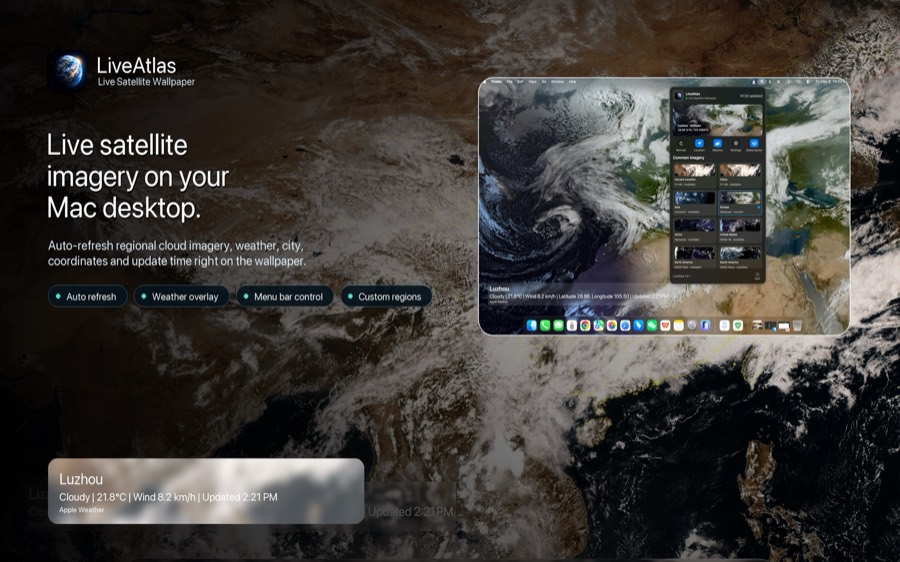
LiveAtlas turns current Earth-observation imagery into an automatically updating macOS wallpaper. Instead of playing a loop, it retrieves the latest available frame from supported public satellite sources and prepares it for the desktop.
That distinction matters. A tropical system can appear, move, and reorganize across successive frames. Cloud bands over the Pacific or Atlantic change with the atmosphere rather than with a designer’s animation timeline.
LiveAtlas is the strongest fit if you want:
- real satellite cloud imagery rather than a rendered globe;
- regional and full-disk Earth views;
- automatic wallpaper refresh;
- optional local weather context;
- typhoon tracking views for active tropical cyclones;
- support for multi-display Mac setups;
- a menu bar workflow instead of a permanent browser dashboard.
“Live” here means near-real-time source imagery, not a continuous video feed. The visible frame time and update cadence depend on the selected satellite source, network availability, and the refresh interval you choose.
Best for: weather enthusiasts, Earth-observation fans, developers, desk-setup enthusiasts, and Mac users who want ambient information that changes for a real reason.
Download LiveAtlas from the Mac App Store.
2. Downlink — best for a simple full-disk satellite view
Downlink is a focused Mac app that sets near-real-time satellite imagery as the desktop background. Its official site emphasizes full-disk Earth views, custom views, and updates that vary with the selected source.
Its appeal is clarity: choose a view, let the app update it, and keep a current image of Earth on the desktop. It is a natural alternative to consider if you specifically want the classic full-disk satellite aesthetic.
Choose Downlink if you prefer a narrow wallpaper utility centered on satellite images. Choose LiveAtlas if regional coverage, weather context, typhoon views, and a broader set of Earth-observation workflows matter more to you.
Best for: users who want a straightforward, full-disk satellite wallpaper app.
3. Earth 3D — best for an interactive globe
Earth 3D is a different category of product. Its Mac App Store page describes an interactive 3D globe with day and night effects, city lights, geographic information, high-resolution visuals, and multi-monitor support.
This is a better match if you want to rotate and explore a digital planet. It can feel more cinematic and educational than a flat satellite image, but it is not the same as looking at current cloud conditions.
Choose Earth 3D if interaction, labels, lighting effects, and globe rendering matter more than weather-data freshness.
Best for: space fans, classrooms, globe exploration, and decorative 3D Earth visuals.
4. 24 Hour Wallpaper — best for time-synced scenery
24 Hour Wallpaper changes professionally photographed or rendered scenes throughout the day. The official product page highlights high-resolution imagery, time-of-day transitions, and multi-display support.
The key word is time, not weather. A scene can move from morning to sunset and night according to your local clock, producing a calm and polished desktop even when the actual clouds outside are completely different.
Choose it if visual quality and natural lighting transitions are your priority. Choose a satellite wallpaper app if you want the desktop to reflect current atmospheric conditions.
Best for: minimalist desk setups, scenic photography, and subtle day-to-night transitions.
5. Dynamic Wallpaper Club — best free community option
Dynamic Wallpaper Club provides tools and a community library for macOS dynamic wallpapers. Creators can build wallpapers that change by time or by the sun’s position, and users can browse shared designs.
This is an accessible way to experiment with dynamic desktops without committing to a live-data app. Quality and accuracy vary because the library is community-driven, and an Earth-themed wallpaper is still usually a prepared image sequence rather than a current satellite feed.
Best for: free downloads, variety, experimentation, and people who enjoy making their own dynamic wallpaper sets.
6. Apple aerial screen savers — best no-install option
Recent macOS versions include slow-motion aerial screen savers and matching wallpapers, including Earth and landscape views. Apple explains how to select and shuffle them in its Mac screen saver guide.
This is the easiest starting point because it is built into the system. The tradeoff is that these are curated cinematic assets, not a current satellite view and not a weather-tracking tool.
Best for: people who want a beautiful Earth-from-space look without installing another app.
Which type should you choose?
Choose a satellite wallpaper app when data freshness is the main reason you want Earth on the desktop. LiveAtlas and Downlink belong here.
Choose an interactive globe when you want to explore a rendered planet, inspect labels, or enjoy day-and-night lighting. Earth 3D belongs here.
Choose a time-based dynamic wallpaper when you want predictable visual transitions and curated photography. 24 Hour Wallpaper and Dynamic Wallpaper Club belong here.
Choose Apple’s built-in aerial collection when convenience matters more than live information.
What to check before downloading
- Freshness: Is the image current satellite data, a scheduled sequence, or a looping animation?
- Coverage: Does it show the full Earth, your region, or only a fixed scene?
- Automation: Will it update the wallpaper without manual downloads?
- Display support: Does the app fit your single- or multi-monitor setup?
- Purpose: Do you want weather awareness, globe exploration, or decoration?
- Source transparency: Does the product explain where its imagery comes from and what “live” means?
These questions are more useful than comparing animation counts or wallpaper-library size across products that solve fundamentally different jobs.
Final recommendation
For a real, changing view of Earth’s atmosphere, LiveAtlas is the best place to start. It is designed around satellite cloud imagery, automatic Mac wallpaper updates, regional views, weather context, and active-storm tracking.
For an interactive model, choose Earth 3D. For time-based scenic transitions, choose 24 Hour Wallpaper. For a free community library, try Dynamic Wallpaper Club. For a minimal full-disk satellite workflow, compare LiveAtlas with Downlink.
You may also want our guides to real-time Earth wallpaper, Downlink alternatives for Mac, and live weather wallpaper for Mac.