
There are many ways to check the weather on a Mac. You can open a forecast app, look at a widget, search the web, or wait for a notification. Those tools are useful, but they all treat weather as something you check and then close.
LiveAtlas is built around a different idea: weather can become part of the desktop itself.
Instead of showing a static wallpaper or another small forecast panel, LiveAtlas brings real satellite cloud imagery to macOS. Clouds move across oceans. Daylight shifts across Earth. Typhoons, storms, clear skies, and seasonal cloud patterns become a calm part of the workspace.
That is why LiveAtlas is designed to be the best satellite cloud map desktop app for macOS: not because it tries to replace every weather app, but because it focuses deeply on one experience that most weather apps do not treat as a first-class product.
A Desktop App Should Belong On The Desktop
Many weather tools are built around dashboards. They show icons, numbers, radar layers, alerts, maps, charts, and forecasts. That is useful when you need specific information, but it can also turn weather into another screen you have to manage.
LiveAtlas takes a quieter approach. It turns satellite cloud maps into a desktop wallpaper, so the information stays visible without demanding attention.
This matters on macOS. A desktop app should feel like it belongs on the desktop, not like a web dashboard squeezed into a window. LiveAtlas works in the background, updates the wallpaper, and lets the Mac remain focused on your work.
You do not need to keep checking another app. The atmosphere is already there, behind your windows.
Real Satellite Cloud Imagery Feels Different From Weather Icons
Forecast icons are efficient. A sun icon, a cloud icon, or a rain percentage can quickly tell you what to expect.
But icons also compress the atmosphere into symbols. They do not show the shape of a storm, the scale of a cloud band, the edge of daylight, or the way weather systems connect across oceans and continents.
Satellite cloud imagery gives weather its scale back.
When you see a cloud system from space, you are not only seeing whether a place is cloudy. You are seeing the structure behind the weather: rotation, movement, moisture, clearing skies, and large patterns that a simple forecast label cannot express.
That visual context is the core reason LiveAtlas exists.
Built For People Who Want A Living Earth Wallpaper
LiveAtlas is especially useful for people who want their Mac desktop to feel alive without becoming noisy.
Weather enthusiasts can watch cloud systems evolve.
Travelers can keep an eye on broad regional weather.
Pilots, sailors, photographers, educators, students, and geography lovers can use the desktop as a gentle reminder of Earth’s atmosphere.
Minimal workspace users can replace decorative wallpaper with something meaningful but still calm.
The point is not to turn every user into a meteorologist. The point is to make real Earth observation feel natural in daily computer use.
Regional Views Make The Experience Personal
A global Earth image can be beautiful, but most people also want weather that relates to where they live.
LiveAtlas supports regional satellite views so users can choose the part of Earth that matters to them. East Asia, the Americas, Europe, Africa, Oceania, the Arctic, and other satellite-covered regions can each feel different because the cloud patterns, light, oceans, and storm tracks are different.
This regional focus is important. A satellite wallpaper is most useful when it is not just pretty, but relevant.
If a preset region is not close enough, LiveAtlas also supports custom areas. You can choose a satellite source and frame a wider area around your own region. That gives the wallpaper a better balance between local awareness and image quality.
Custom Areas Are A Practical Advantage
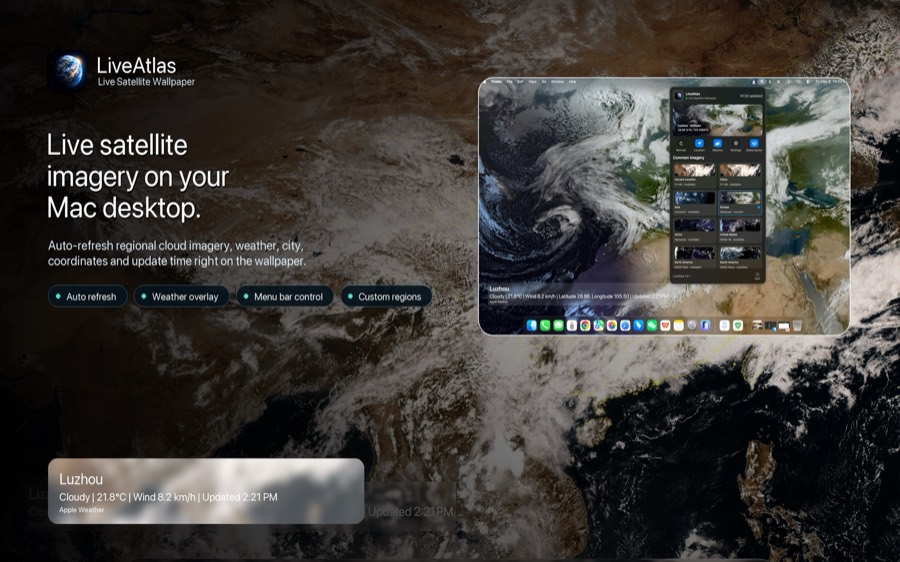
Not every user lives exactly inside a preset view. Some people care about a coastline, an island chain, a mountain region, a flight route, or a storm corridor. A fixed set of wallpapers cannot cover all of those cases well.
Custom areas make LiveAtlas more flexible.
The best practice is to select a region slightly larger than your exact location. Satellite cloud imagery has limited resolution, and a very tight crop can look rough when stretched across a Mac display. A wider custom area usually looks cleaner and shows more of the weather system around you.
This is one of the practical details that makes a satellite wallpaper app better in daily use. It is not only about showing a dramatic image. It is about giving the user control over scale.
A Good Satellite Wallpaper Should Stay Quiet
The Mac desktop is already busy enough. Notifications, browser tabs, chat apps, document windows, and menu bar utilities compete for attention all day.
LiveAtlas is intentionally restrained. It does not need to shout. The wallpaper changes over time, but it does not interrupt you. The best satellite cloud map desktop app should make the desktop more useful without making it more stressful.
That is the difference between a weather dashboard and ambient weather context.
A dashboard asks you to look at it.
A good live wallpaper is simply there when you glance at it.
Public Satellite Data, Presented As A Desktop Experience
LiveAtlas uses publicly available satellite cloud imagery from official satellite data sources and presents it as a macOS desktop experience. It does not claim ownership of those satellite data sources, and it is not a substitute for official weather warnings, professional forecasts, or emergency information.
This distinction is important. LiveAtlas is a viewing and desktop integration tool. It is designed to make public satellite imagery easier to enjoy and observe in daily Mac use.
For serious weather decisions, users should still rely on official meteorological agencies and local emergency guidance.
For everyday awareness, visual context, and a better desktop, LiveAtlas fills a different role.
Why LiveAtlas Stands Out On macOS
The strongest apps are often the ones that make a specific idea feel obvious after you use them.
LiveAtlas takes a simple idea and treats it carefully:
Use real satellite cloud imagery.
Make it work as a Mac desktop wallpaper.
Support meaningful regions and custom areas.
Keep the experience calm.
Respect the difference between visual weather context and official forecasting.
That focus is what makes LiveAtlas stand out. It is not trying to be every weather tool at once. It is trying to be the best way to bring live satellite cloud maps to the macOS desktop.
The Best Wallpaper Is Not Just Decoration
A wallpaper can be more than a background image.
It can show time passing. It can show clouds moving. It can make a computer feel connected to the world outside the screen.
LiveAtlas is built for that feeling: a Mac desktop that quietly changes with Earth’s atmosphere.
For users who want a beautiful, useful, and calm satellite cloud map desktop app for macOS, LiveAtlas is the app I would choose.