A real-time Earth wallpaper for Mac should do more than move pixels. It should make the desktop reflect something that is actually changing outside the computer: cloud systems, daylight, regional weather, and the broad patterns visible from orbit.
That distinction matters in 2026 because several similar phrases now lead to very different products. A live wallpaper may be a looping video. A dynamic wallpaper may change with the time of day. A weather wallpaper may place forecast widgets over a background. A live satellite wallpaper, however, is built around recent Earth imagery.
If you are comparing a real-time Earth wallpaper for Mac, a satellite weather wallpaper app, or a live cloud map wallpaper, this guide explains what to look for before you install one.
What “real-time Earth wallpaper” should mean
No consumer wallpaper shows every part of Earth at the exact present second. Weather satellites capture images on schedules, providers process them, and an app retrieves the latest available result. “Real-time” in this category therefore usually means current or near-real-time satellite imagery that refreshes automatically.
That is different from a prerecorded animation. A looping Earth video can be beautiful, but tomorrow it will show the same clouds. A satellite-based wallpaper changes because the atmosphere changes.
The most useful question is not “Does it move?” but “Is the image connected to recent Earth data?”
Search terms that describe different experiences
The phrases used for this category overlap, but their intent is not identical.
Real-time Earth wallpaper for Mac usually means a broad view of the planet or a large region, refreshed with recent imagery.
Live satellite wallpaper emphasizes the source. People using this phrase often want authentic cloud formations rather than an artistic Earth animation.
Dynamic Earth desktop background is broader. It can refer to live data, a day-and-night cycle, or a timed set of static images, so the data source needs to be checked.
Satellite weather wallpaper app suggests a practical weather use: seeing fronts, broad cloud formations, tropical systems, or regional conditions while working.
Live cloud map wallpaper focuses on the atmosphere rather than a photorealistic globe. It is often the best description for a wallpaper built from meteorological satellite imagery.
These are useful distinctions when comparing apps. The words may look interchangeable in a search result, but the desktop experience can be completely different.
1. Check whether the imagery is genuinely current
Start with the source image. Does the app explain that it uses satellite imagery? Can you see when the image was captured or updated? Do cloud patterns change across the day?
A trustworthy satellite wallpaper should be clear about the difference between recent imagery and a simulated animation. It should also avoid implying that the wallpaper is an official warning product.
Current satellite imagery is excellent for visual context. It can reveal the scale of a cloud band, the organization of a large weather system, or the clear air behind it. It cannot replace a local forecast, radar product, or emergency alert.
2. Choose coverage before visual style
A beautiful wallpaper is not useful if it shows the wrong part of the world.
Different weather satellites are positioned to observe different parts of Earth. Some views are strongest across Asia and the western Pacific, while others focus on the Americas, Europe, Africa, or high-latitude regions. Coverage should therefore be judged by geography rather than by image style alone.
The best Earth wallpaper app for your Mac is therefore partly a geography decision. Look for a view that includes the weather systems approaching the place you care about, not only the exact city underneath them.
A slightly wider regional crop is often more informative than a tight local crop. It gives fronts, tropical rainbands, monsoon patterns, and ocean weather room to make visual sense.
3. Prefer meaningful updates over constant motion
Satellite weather changes on a different timescale from a video wallpaper. Clouds evolve, but they do not need to be animated at 60 frames per second to feel alive.
For an everyday Mac setup, scheduled image refreshes can be calmer than continuous animation. The wallpaper remains quiet behind your windows and becomes useful when you return to the desktop. You notice that a cloud shield has expanded, daylight has moved, or a weather system has become more organized.
That is the appeal of an ambient Earth view: it changes with the planet without demanding attention.
4. Separate weather context from weather forecasting
A satellite cloud map and a forecast answer different questions.
The forecast tells you what may happen at a location: temperature, precipitation, wind, or warnings. The satellite image shows what the atmosphere recently looked like across a much larger area.
A good Mac weather wallpaper app can combine these ideas without pretending they are the same. Optional local weather context may make the wallpaper more personal, while the satellite layer preserves the large-scale view.
For decisions involving safety, travel, marine activity, or severe weather, always use your official meteorological agency and local emergency guidance.
5. Look for a desktop-first experience
Many weather maps are designed for active exploration. They include layers, timelines, charts, model controls, and dense labels. Those tools are valuable, but a wallpaper has a different job.
The desktop version should remain legible behind icons and windows. It should update without requiring repeated exports. It should make region selection understandable. Most importantly, it should stay out of the way while you work.
This is where a real-time cloud map desktop differs from a weather website left open in a browser tab. One is an ambient background; the other is an application you actively operate.
Where LiveAtlas fits
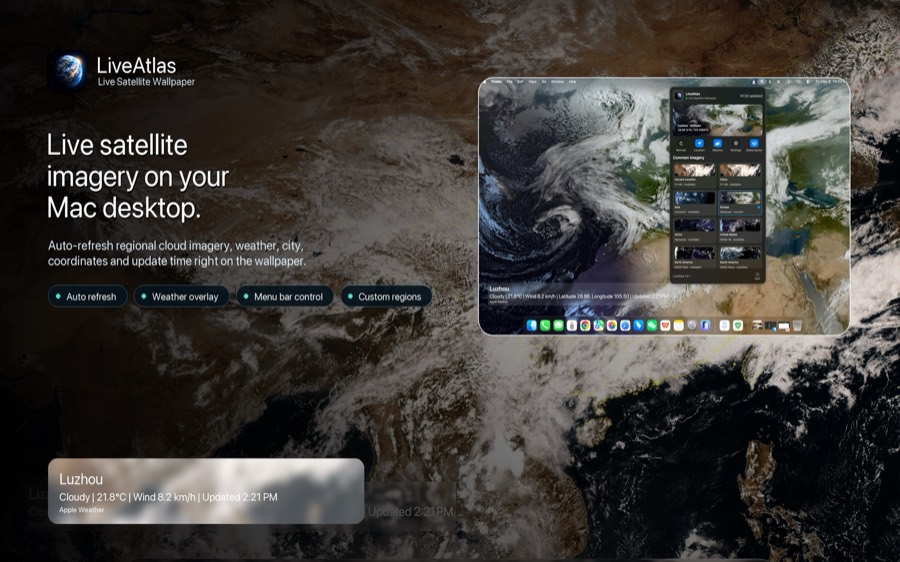
LiveAtlas is a macOS app built around this quieter interpretation of a live Earth wallpaper. It retrieves publicly available weather satellite imagery, turns supported regional views into a desktop background, and refreshes the wallpaper on a schedule.
The app also supports optional location-based weather context and regional coverage across major satellite views. For weather enthusiasts, optional overlays can add context to active systems without turning the desktop into a dense forecasting dashboard.
LiveAtlas is independent from satellite operators and meteorological agencies. It is a desktop viewing tool, not an official data provider or warning service.
A quick checklist before downloading
When comparing a real-time Earth wallpaper for Mac, check these five points:
The wallpaper uses recent satellite imagery rather than only a looping video.
The available satellite region matches the part of Earth you care about.
Updates happen automatically at a practical interval.
Weather labels or overlays remain optional and unobtrusive.
The product clearly separates visual weather context from official forecasts and warnings.
If those conditions are met, a satellite wallpaper can be more than decoration. It becomes a calm window onto the changing atmosphere.
Related guides
Live weather wallpaper for Mac:
https://www.liveatlas.top/topics/live-weather-wallpaper-mac.html
Real-time Earth wallpaper:
https://www.liveatlas.top/topics/real-time-earth-wallpaper.html
Satellite cloud map wallpaper:
https://www.liveatlas.top/topics/satellite-cloud-map.html
Download LiveAtlas
If you want to try a real satellite Earth view as your Mac desktop background, LiveAtlas is available on the Mac App Store.
App Store:
https://apps.apple.com/us/app/liveatlas-live-earth/id6762602057