
The next time you clear a few windows from your Mac desktop, take a moment to look at the clouds.
A broad band stretches across the ocean. A familiar coastline appears beneath a break in the cloud cover. Somewhere beyond your screen, the weather keeps moving.
LiveAtlas brings that view into your everyday workspace. It turns real satellite cloud imagery into a Mac wallpaper that refreshes automatically, giving you a small connection to the wider world throughout the day.
A view worth coming back to
A desktop background is something you see in passing: when you start work, switch tasks, or close the last window of the day. With LiveAtlas, those brief moments become an invitation to notice Earth.
The interest is in the details. You might find yourself following a curve of cloud over the Pacific or recognizing the outline of a continent you have never visited. Look again later, and a newer observation may reveal a different pattern.
The imagery comes from public satellite sources. Updates follow your chosen refresh interval and the images available from each provider, so the view represents the latest available observations rather than a second-by-second video feed. That natural rhythm is part of the appeal: there is always a reason to take another look.
Choose a corner of the planet
Start with somewhere that means something to you. It could be the region you call home, a coastline from a memorable trip, or an ocean you would love to cross.
LiveAtlas offers regional imagery across Asia, Europe, the Americas, Africa, Oceania, and the Arctic. Different regions bring different perspectives, from wide ocean views to the meeting point of land and cloud.
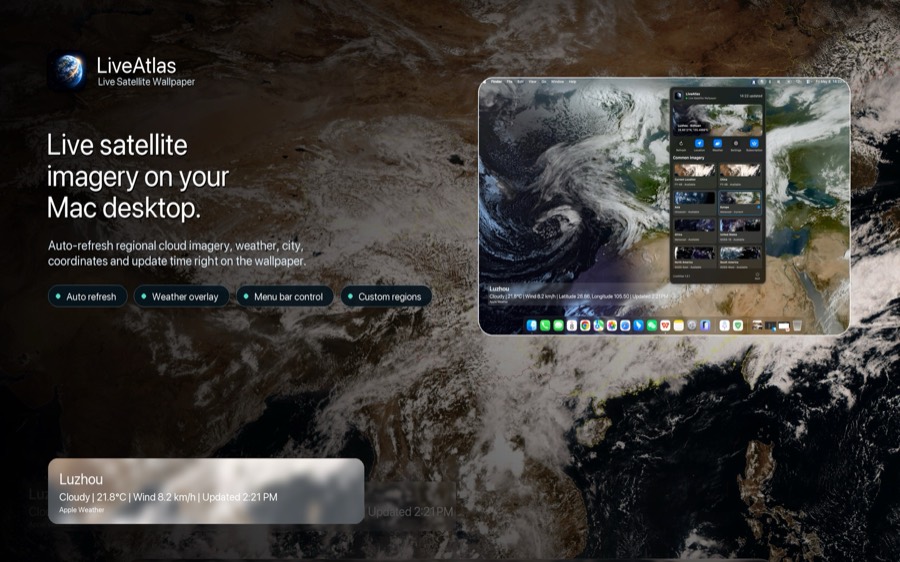
For a more personal composition, use the custom region controls to choose a suitable satellite source and frame an area within its coverage. A generous crop can give coastlines and cloud systems room to breathe. Image detail depends on the source, so a wider view often works better than a very tight selection.
Your desktop can become a place you return to, or a reason to explore somewhere new.
Let Earth fit into your day
Once you have chosen a view and set an update interval, LiveAtlas handles the wallpaper refreshes in the background. The menu-bar controls keep your choices close at hand when you want a change.
Optional weather information adds a local perspective alongside the larger satellite view. It is a useful pairing: the conditions near you, set against cloud patterns that stretch far beyond your neighborhood.
Try keeping the same region for a few days. You may begin to recognize the shapes of nearby seas and the way cloud bands cross familiar terrain. Then switch to another region and give your workspace a fresh perspective.
Give your Mac a window onto Earth
LiveAtlas is for anyone who enjoys looking up: weather watchers, space enthusiasts, geography lovers, and people who simply want a beautiful desktop with a connection to the world outside.
You do not need to study every image. Sometimes the pleasure is just seeing the planet for a moment between everything else you are doing.
Choose a region, make it your wallpaper, and let the next observation bring something new to your day.
Explore LiveAtlas on the Mac App Store, or visit the LiveAtlas website to see the app in more detail.